Category Archives: Malware

Infected Samsung S8500 Wave SmartPhones

Samsung’s new phone, the S8500 Wave, has appeared in Germany with its memory card infected with malware. And it’s fairly dangerous, if it installs itself onto your computer it will download backdoor programs and spyware, making your computer wide open to hackers and criminals. Prevention is definitely better in these cases.

The malware can affect Windows computers if you connect the phone to the computer. It’s as simple as that.

There are a couple of things you can do to avoid this malware, and to avoid similar malware in the future from similar scenarios:

  • Disable the autorun feature in Windows (click here for instructions)
  • Install a good antivirus package.

This type of problem is becoming more frequent – ordinary consumer devices infected with malware at the factory.

Facebook Password Reset (Virus)

I received an email that claims to be from Facebook (it’s a forged email). The email is designed to trick people into opening the attachment. Here’s what the it says,

Hey [name removed],

Because of the measures taken to provide safety to our clients, your password has been changed. You can find your new password in attached document.

Thanks,
The Facebook Team

There’s another version some people have received that is similar but has a different introduction and sign off,

Dear user of facebook,

Because of the measures taken to provide safety to our clients, your password has been changed. You can find your new password in attached document.

Thanks,
Your Facebook

Both of these emails come with a virus attached. And neither of these emails were actually sent from Facebook. In fact, Facebook had absolutely nothing to do with it, the scammers just mention the word to encourage people to open the attachment.

So as always, be suspicious of unsolicited emails, and be suspicious of attachments you didn’t ask for.

ICS Monitoring Team

Another email designed to scare you and possibly make you curious enough to open an attachment.

The attachment has a virus, of course. And the email has all of the usual traits such as poor spelling and grammar. Below is what it says,

Your internet access is going to get suspended

The Internet Service Provider Consorcium was made to protect the rights of software authors, artists.
We conduct regular wiretapping on our networks, to monitor criminal acts.

We are aware of your illegal activities on the internet wich were originating from

You can check the report of your activities in the past 6 month that we have attached. We strongly advise you to stop your activities regarding the illegal downloading of copyrighted material of your internet access will be suspended.

Sincerely
ICS Monitoring Team

If you receive this email, delete it. Do not open the attached file.

Microsoft Does Not Send Updates By Email

Companies do not send updates by email, including Microsoft. They use other methods to tell their users about updates then expect users to download the updates themselves. Attachments in emails are generally bad.

So the following email I received is clearly an attempt to spread malware. It’s an email that claims to be from Microsoft – a quick look at the email’s header shows that it came from branchen4u.de. Not Microsoft.

So apart from the suspicious attachment and forged sender address, the other thing that tipped me off is that I don’t actually use Microsoft Outlook or Outlook Express.

Below is a copy of the infected email:

Brief Description
Microsoft has released an update for Microsoft Outlook / Outlook Express. This update is critical and provides you with the latest version of the Microsoft Outlook / Outlook Express and offers the highest levels of stability and security.

Instructions

* Install Update for Microsoft Outlook / Outlook Express (KB910721). To do this, follow these steps:
1. Run attached file officexp-KB910721-FullFile-ENU.exe
2. Restart Microsoft Outlook / Outlook Express

System Requirements

* Supported Operating Systems: Windows 2000; Windows 98; Windows ME; Windows NT; Windows Server 2003; Windows XP; Windows Vista

* This update applies to the following product: Microsoft Outlook / Outlook Express

There was a zip file attached that contains the Bredlab trojan. If the trojan were installed it runs quietly in the background downloading viruses and other malware.

So again, don’t trust unsolicited emails. I didn’t ask Microsoft to email me patches so this one was unsolicited. And it turns out it contained a trojan.

You should also have a good antivirus package installed.

Facebook Un Named App

Here’s a combined hoax and malware. Let’s start from the beginning.

People have been posting notes on Facebook about something called “un named app”. It tells you to remove something from Facebook. It’s a hoax. Don’t believe what it says, don’t follow the instructions, and don’t pass it on.

Below are some quotes of the hoax:

ALERT >>>>> Has your facebook been running slow lately? Go to “Settings” and select “application settings”, change the dropdown box to “added to profile”. If you see one in there called “un named app” delete it… It’s an internal spybot. Pass it on

this is real.. i checked and found this app and deleted it… hopefully, my facebook will run better now.

Cannot believe how much quicker mine is running after doing this….

I don’t have this app on my Facebook account but if you do, don’t worry. It’s a normal part of Facebook and you shouldn’t delete it.

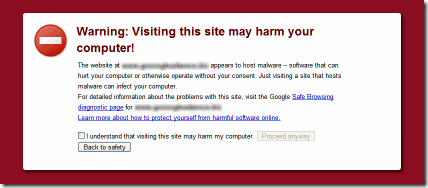
Now the second part of this hoax is a real trojan. If you go to Google and search for “facebook unnamed app” you’ll see quite a few results. Some of these results are fake antivirus programs.

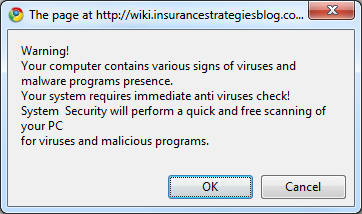
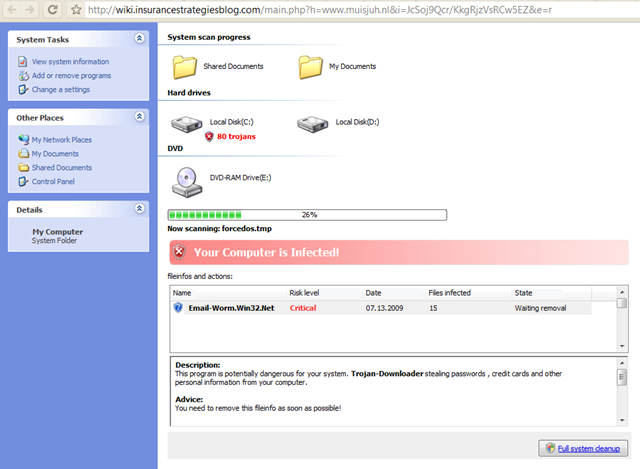
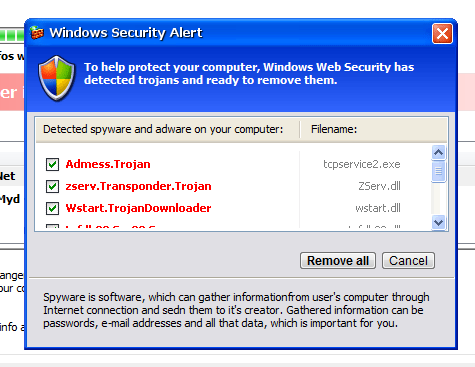
A fake antivirus program is actually a trojan. It pretends to scan your PC and quietly installs malware in the background. It goes under the name of Security Tool, it has a fancy detection screen and everything. But it’s definitely bad.

The rule of thumb is that if a web page tells you that your PC might be infected, don’t trust it. Go and get your own antivirus program, not something that pops up on your screen (see here for a good free antivirus program).

There’s a lot to learn here. Basically, be careful who you trust. These days scammers have to trick you into installing malware and they’re good at it (it’s called social engineering).

iPhone Viruses

A lot has happened in the past week with iPhones. First let me explain what “jail breaking” means.

iPhones have some security built-in, courtesy of Apple. This security’s main purpose is to let Apple decide what you can and can’t do with the phone. For example, you can buy and install an approved program, you can’t install a hacked program.

Now there are plenty of people in the world who want to use their iPhones in ways not sanctioned by Apple, such as using it on a non approved network or running non approved programs. So these people remove this layer of security. This is known as “jail breaking”.

Now for a summary of what’s happened recently:

First, there was a practical joke called “rickrolling” – some people found their phone’s wallpaper (background image) changed to a photo of the singer Rick Astley. It was a practical joke, harmless.

How were these phones hacked? Someone wrote a program that looks on the internet for vulnerable iPhones and installs this wallpaper, then the program copies itself to that phone and does the same thing to others. (More details here)

It only affected some jail broken phones. People were told that it’s nothing to worry about.

Then a couple of days later someone else took this idea and wrote a malicious version that works the same way. Again, only some jail broken phones are vulnerable. Except this time instead of being a practical joke it steals personal data.

It connects to a server in Lithuania and lets hackers connect to the phone and do what they want (such as stealing passwords and reading SMS’s). This is bad.

How can you protect your iPhone?

  • Firstly, if you don’t jailbreak your phone you have nothing to worry about.
  • If you do jailbreak your phone you need to change a special password that’s built into the phone. The password is usually “alpine” – you can’t see this password unless you know what you’re doing but it’s there and it needs to be changed. There are instructions here on how to do this.

Summary

An iPhone is a “smartphone”, meaning that it basically works like a computer and it has an internet connection just like a computer. And like computers it can be hacked and can get viruses. Apple goes to a lot of trouble to make sure everything works well (it’s in their best interest to deliver a quality product) so people who go about circumventing the device’s security are taking a great risk.

Facebook Password Reset

The following email contains a virus, it was not sent by Facebook:

Because of the measures taken to provide safety to our clients, your password has been changed.
You can find your new password in attached document.
Thanks,
The Facebook Team

Because of the measures taken to provide safety to our clients, your password has been changed.

You can find your new password in attached document.

Thanks,

The Facebook Team

If you see this email just delete it. Don’t click on the attached file.

A Sophisticated Way To Steal Money

Here’s an example of a very sophisticated piece of malware designed to steal money. It was discovered recently in Germany and was used to steal €300,000 in 3 weeks. Here’s how it works:

  1. You visit a web page that has been hacked. It’s an ordinary web page (such as a news site), nothing looks out of the ordinary.
  2. A trojan is installed on your computer without your knowledge. It sits there on your PC waiting and watching.
  3. You log onto your internet banking site. Everything still looks normal.
  4. The trojan detects that you’ve logged into an internet banking site and it makes a transaction, transferring money from your account to the account of a money mule (more on this later).
  5. When you look at your bank statement online, the trojan captures the network data and changes it to hide the transaction it made. The numbers it shows on the screen have been altered.

Step 5 is the sophisticated part of this attack. Normally you’d notice if money was transferred from your bank account without your approval, but the trojan hides this by showing you a fake statement on your screen. If you can’t see the money being taken from your account the criminals have more time to keep making withdrawals.

The amount of money it steals is different each time so that the bank’s anti-fraud detectors don’t see the pattern of theft.

More details here on this attack works.

So what’s a money mule?

Stealing money from people’s bank accounts is a big business. Criminals not only write sophisticated malware to carry out the transactions, they also recruit money mules to launder the money.

They place ads online offering jobs to desperate people. These jobs require no experience and you work from home (sound familiar?). People who sign up to these jobs receive money in their bank accounts, then they have to transfer it to someone else’s account. They do this willingly and are paid for it, but they usually don’t know that it’s part of a criminal organisation.

This is how the criminals receive their stolen money and cover their tracks. It’s a form of money laundering and is illegal. And to avoid a pattern detection they usually only use these money mules twice.

Here’s an example of a money mule job ad.

Lessons Learnt:

  • Always use an antivirus program that not only scans your PC for malware, but also checks every web page you go to. Good antivirus programs cost money and it’s a good investment to protect your online security.
  • Only use internet banking from a PC you trust.
  • Always update your PC with the latest patches. For example, tomorrow there’ll be a large Windows update, you should install this as soon as possible (after you make a backup).
  • Don’t trust job ads that promise the world for little to no effort.

Malware Statistics

Avast! is a company that makes a decent anti-virus program. They recently published some statistics that are interesting:

  • Their anti-virus programs blocks 1 billion malware a month. That’s 1,000,000,000 attempts to install viruses, trojans, password stealers, etc on to people’s PCs. A month. And that’s just by one small company.
  • 1 in 15 people encounter a malware every day.
  • They find about 3,000 new malware each day (that’s new and unique viruses, trojans, etc). They have 2.1 million in their database.

These statistics are not just marketing numbers, they give you an idea of how serious a problem malware is. If you don’t have a good anti-virus system installed on your computer they you need to take action now (today) and install something to protect you. Good anti-virus systems generally cost money – it’s a good investment, the cost of not buying one is usually greater.

And get something from a known vendor. Last week I talked about a comparison of anti-virus programs, you can use this as a guide.

And Macs and Linux computers aren’t safe either.